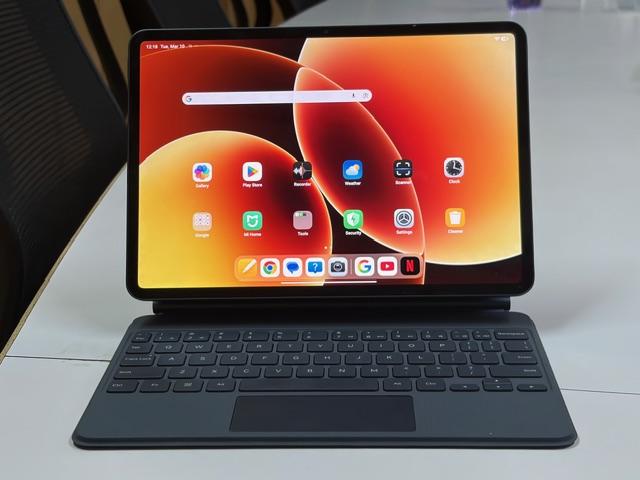
Xiaomi has expanded its tablet portfolio with the launch of the Xiaomi Pad 8, a device positioned to balance productivity and entertainment in a sleek form factor. Featuring an 11.2-inch display and powered by Qualcomm Snapdragon 8s Gen 4, the Android tablet packs a 9,200mAh battery and supports accessories for boosting productivity. But whether the Pad 8 fully delivers on that promise in practice is something we’ll dig into throughout the review.
As someone who is constantly switching between work and entertainment, I spent a few days using the Xiaomi Pad 8 as part of my everyday routine to see if it really fits into an always-online Gen-Z workflow.
Display: Big and bright
The Xiaomi Pad 8 features a large display that immediately feels immersive, particularly if you spend a lot of time watching videos, browsing social media, or reading articles. In my experience, the screen appears sharp and vibrant, making everything from YouTube videos to photos stand out with good colour and clarity, although the reflective panel, like most tablets, can pick up reflections. It is bright enough to use comfortably in well-lit environments. When paired with a case or one of the keyboard accessories, it also becomes a far more portable option compared to a laptop.
Scrolling through apps, jumping between tabs, or simply moving around the interface feels smooth and responsive. After using it for a while, you start noticing how much that smoothness improves everyday use.
For someone like me who often uses a tablet to stream during short breaks, the larger screen and bright panel work well for watching shows or catching up on videos. The display is bright enough for indoor use and even near windows, although using it under direct sunlight can still be a bit tricky.
Design and look: Minimal
The first thing I noticed about the Xiaomi Pad 8 is how clean and minimal the design feels. It has an aluminium frame and body, which instantly gives it that premium tablet vibe when you pick it up.
What really stood out to me is how thin and lightweight the tablet feels. At around 5.7–5.8mm thick and roughly 485g, it feels noticeably lighter than some of the other tablets I’ve reviewed recently. It’s slim enough to easily slip into a backpack, and light enough to carry around the house with one hand without feeling bulky. From a Gen-Z perspective, that matters because this is the kind of device you end up carrying everywhere, from a desk setup to the couch, or even to a cafe when you want a bigger screen than your phone.
Another thing I liked was the weight distribution. Even during longer streaming sessions or while holding it to read articles, the tablet didn’t feel uncomfortable in the hand. The bezels, however, aren’t slim from what I noticed and could have been narrower. That said, the 11.2-inch screen still feels large enough, which helps make videos and scrolling more immersive.
Sound: Loud but not punchy
The audio is decent but not perfect. At medium volume, the speakers don’t feel very strong, especially when it comes to bass. Voices are clear, but music or action scenes don’t sound punchy. It’s not obvious at first, though — you usually start noticing it after using the speakers for a while.
One thing I did like, though, is that the speakers can get quite loud. With a tablet like this, you can easily turn almost any place into a quick movie or music spot — whether you’re at your desk, on your bed, relaxing on the couch, or even sitting out on the balcony during an evening.
From my perspective, the sound setup works well for what most people actually use a tablet for — watching matches, binge-watching shows, scrolling reels, or casual gaming. It’s loud, clear, and immersive enough that I rarely felt the need to plug in headphones unless I wanted a more cinematic audio experience.
Battery: Survived a full T20 binge
The Xiaomi Pad 8 packs a 9,200mAh battery and in my usage, it turned out to be long-lasting for long sessions. To really test it, I streamed the T20 World Cup final between India and New Zealand on the tablet with maximum brightness and full volume. By the time the match ended, the battery had dropped from 100 per cent to around 65 per cent, which is quite good for continuous streaming.
Camera: Just there to get the job done
Let’s be honest, cameras on tablets are rarely the main highlight, and the Xiaomi Pad 8 is no exception. In my view, tablet cameras are mostly meant for practical tasks like scanning documents, attending video calls, or quickly capturing something when your phone isn’t around, so I didn’t go in with huge expectations.
In everyday use, the camera does its job fairly well. Whether it was scanning documents, joining a quick video meeting, or snapping the occasional photo, the results were usable. Video calls looked clear enough in good lighting, and document scans came out readable without much effort. It’s not a camera you’ll reach for to take photos regularly, but for the kind of tasks tablet cameras are actually meant for, it works just fine and gets the job done.
Performance: Fits a constant multitasking lifestyle
From my perspective, the performance feels suited to how many of us actually use tablets. It’s great for juggling a mix of tasks — one moment you’re working on a document, the next you’re watching YouTube, scrolling through social media, or playing a quick game. The high refresh rate display also makes scrolling feel extra smooth, which honestly makes doom-scrolling feel effortless.
The Xiaomi Pad 8 delivers reliable, fast performance for everyday productivity and entertainment. It may not completely replace a laptop for heavy workloads, but for typical tablet use — studying, content consumption, casual gaming, and multitasking — it feels more than capable. I also installed Adobe Lightroom Mobile and VSCO for on-the-go editing, and the Pad 8 handled these tasks well.
The Xiaomi Pad 8 is powered by the Qualcomm Snapdragon 8s Gen 4, paired with up to 12GB of RAM, which puts it firmly in the high-performance Android tablet category. In day-to-day use, the tablet feels fast and responsive — whether you’re switching between apps, browsing with multiple tabs open, or streaming videos.
Stylus and Keyboard: Turning the tablet into a mini workstation
The Xiaomi Pad 8 supports its Focus Pen Pro stylus, which adds another layer to the tablet experience. Writing notes, annotating documents, or quickly sketching ideas feels fairly natural thanks to the pressure-sensitive input and low latency. In day-to-day use, the stylus works well for simple tasks like jotting down notes during meetings or highlighting text while reading.
There’s also the Xiaomi Focus Pen 2, which is especially useful for drawing or photo editing, although it costs more. It supports 16,384 pressure sensitivity levels, pinch gestures for shortcuts, and haptic feedback. The stylus attaches magnetically to the side of the tablet, where it also charges wirelessly. Whether you really need it depends on how you plan to use the tablet. If you draw or sketch often, it can be quite useful. Otherwise, it’s more of a nice extra than a necessity.
The tablet can also be paired with Xiaomi’s Focus Keyboard, which includes backlit keys and a touchpad with gesture support. This setup makes the tablet feel closer to a small laptop. Typing is comfortable enough for longer writing sessions, and the trackpad makes it easier to navigate the interface without constantly touching the screen.
Verdict: Who should buy it
Starting at Rs 33,999, the Xiaomi Pad 8 is a good option if you want a tablet that balances work and entertainment without feeling heavy or complicated. The large, smooth display makes it great for watching videos, browsing, and reading, while the Snapdragon 8s Gen 4 keeps everyday tasks running smoothly. The lightweight design and reliable battery life also make it easy to carry around and use throughout the day, whether you’re working, streaming, or just scrolling.
Where the Pad 8 really makes sense is for users who want a device that sits comfortably between work and entertainment. For students, young professionals, or Gen-Z users who move between note-taking, social media, streaming, and light productivity, it may fit naturally into that lifestyle. The keyboard and stylus accessories can push it closer to a mini workstation, although they do add to the overall cost. If you’re looking for a versatile tablet that handles everyday tasks, entertainment, and casual productivity without feeling bulky, the Xiaomi Pad 8 is an easy recommendation.
Xiaomi Pad 8: Unboxing







