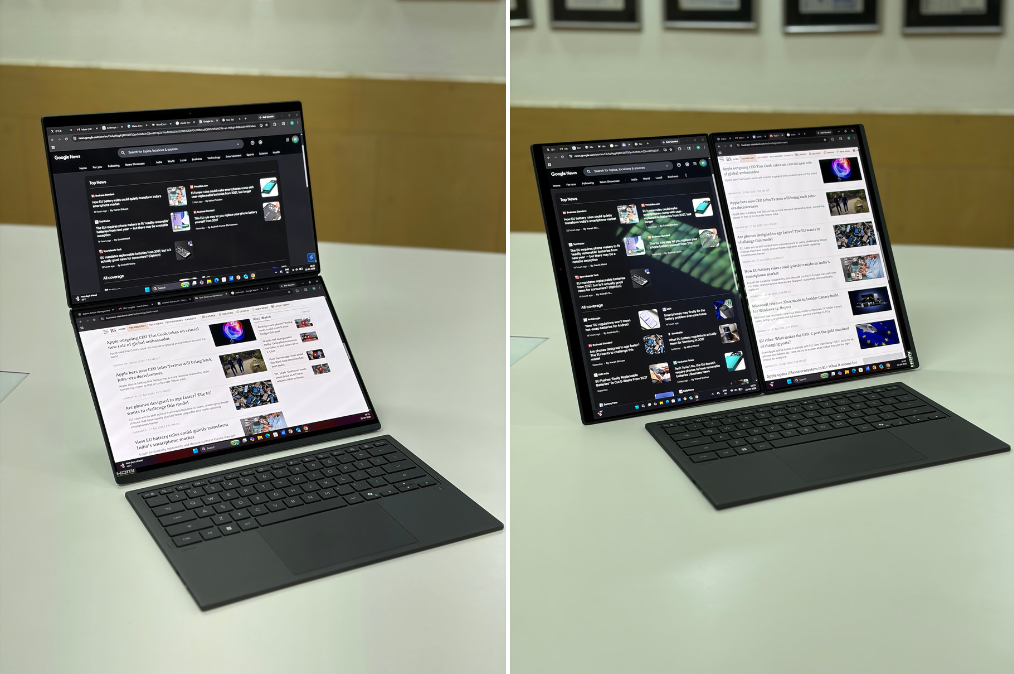
Asus’ Zenbook lineup usually brings a fairly predictable mix—you expect a clean design, dependable performance, and a strong focus on portability. The Asus Zenbook Duo (2026), however, clearly steps away from that formula. Instead, it takes a different route altogether by adding a second full-sized touchscreen into the mix and rethinking how a laptop is meant to be used.
I have been using this device for a few days now as my primary work machine, while also experimenting with its dual-screen setup for multitasking and content consumption. While I’ll be diving deeper into performance, battery life, and overall usability in the full review, here’s what stands out so far.
Asus Zenbook Duo (2026): First impressions
The Zenbook Duo doesn’t try to blend in—and that becomes obvious the moment you open it. At first glance, it looks like a regular 14-inch laptop, but lifting the keyboard reveals a second full-sized display underneath. It’s an unusual design, and it does take a bit of getting used to, but it also feels like one of those ideas that makes immediate sense once you start using it.
The build quality is solid. Asus has used its new “Ceraluminum” finish, which feels slightly textured and different from a standard metal chassis. It adds a bit of grip and gives the laptop a unique feel in hand. The hinge mechanism also feels sturdy, especially considering it has to support two displays stacked on top of each other.
What really defines the experience, though, is how flexible the form factor is. You can use it like a regular clamshell laptop, or detach the keyboard and prop the device up using the built-in kickstand to create a vertical dual-screen setup. Switching between these modes is surprisingly quick and doesn’t feel like a gimmick.
That said, portability does take a slight hit. Compared to a typical 14-inch ultrabook, the Zenbook Duo feels thicker and heavier. That’s expected given the additional hardware, but it’s noticeable if you’re coming from something slimmer.
The keyboard and trackpad setup is interesting. The keyboard attaches magnetically and can be used both docked and wirelessly over Bluetooth. Typing feels comfortable enough, with decent key travel, though the detachable nature means it’s not as rigid as a fixed deck. The trackpad works well, but I did notice a few accidental gesture triggers early on, which may take some getting used to.
The dual-display setup is easily the highlight here. Both are 14-inch OLED panels with identical resolution and colour output, which makes the experience feel cohesive rather than like an add-on. Whether it’s stacking apps vertically, keeping reference material on one screen while working on the other, or simply stretching a window across both displays, the extra screen real estate genuinely changes how you use the laptop.
In fact, having two screens built into the laptop feels far more practical than using an external monitor for multitasking. It’s not just about more space—it’s about having that space available anywhere.
Of course, it’s not entirely seamless. Windows still has its quirks when handling dual-screen layouts, and certain orientations can block ports or affect speaker output. These are small annoyances, but they do remind you that this is still a niche form factor trying to fit into a traditional software environment.
Performance, so far, feels solid. The new Intel Core Ultra 7 chip handles multitasking with ease, and the system remains responsive even with multiple apps running across both screens. Early impressions suggest that this isn’t just a novelty device—it has the power to back up its design.
Battery life is harder to judge at this stage, especially with two displays in play. Early usage suggests it can last through a typical work session, but running both screens at higher brightness will obviously have an impact. I’ll be testing this more thoroughly in the full review.







