Why retro emulation handhelds often make better gaming consoles on the go

Why retro emulation handhelds often make better gaming consoles on the go


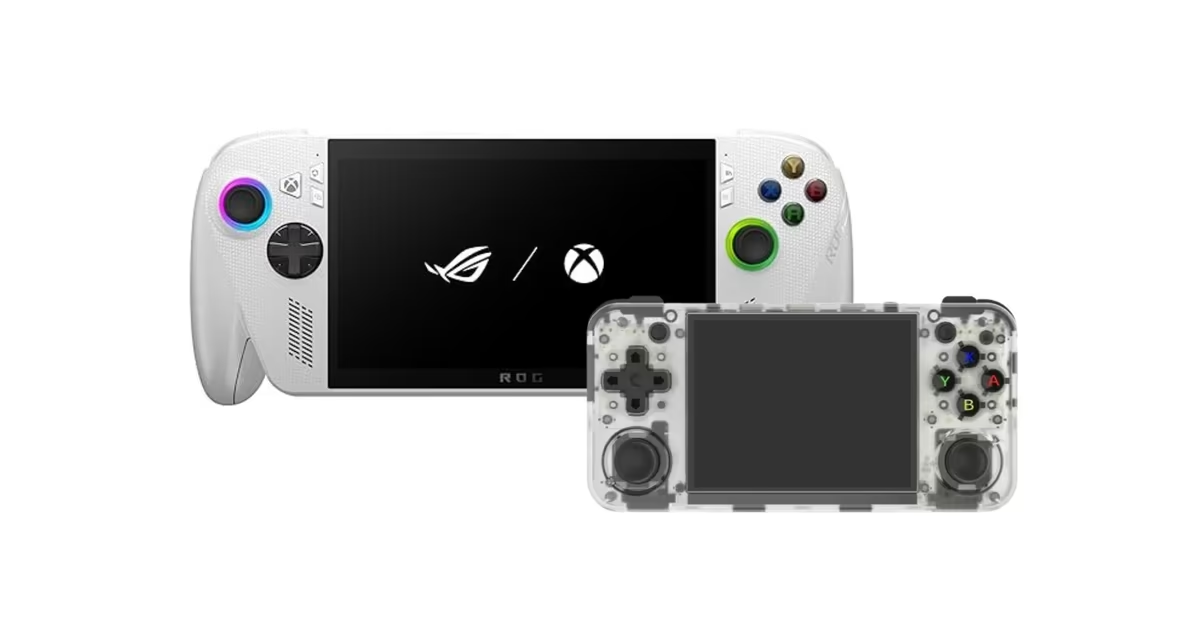
Over the past few years, handheld gaming has split into two very different directions. On one side are powerful Windows-based devices such as the Asus ROG Ally, the ROG Xbox Ally, MSI Claw and similar machines that are essentially compact PCs with controllers attached. On the other are smaller, cheaper retro handhelds such as the Anbernic RG35XX H, built mainly around emulation and older console libraries.


Having spent time with both types, including the ROG Ally, ROG Xbox Ally, Nintendo Switch, and retro handhelds like the Anbernic RG35XX H and MIYOO Mini Plus, I’ve come to think that retro emulation handhelds, despite their limitations, often fit the idea of a “handheld console” better than most modern flagship handhelds.


That does not mean the newer, more powerful devices do not have a use case. In many ways, they are more capable. But capability and suitability for handheld gaming are not always the same thing.


Why retro handheld emulators fit better as handheld consoles


The biggest difference shows up the moment you pick these devices up. Retro handhelds are smaller, lighter, and built around much simpler hardware. Because they are designed to run older games — from systems like the NES, Game Boy, PSP, PS Vita, N64, PS1 and in some cases even PS2 — they do not need large cooling systems, high-wattage chips, or bulky batteries. The result is a device that is easier to carry, more comfortable to hold for longer sessions, and generally less prone to getting hot in your hands.


Most of these devices also run simple, usually Linux-based operating systems. That keeps the experience focused. You turn the device on, pick a game, and start playing. There is very little of the overhead that comes with a full desktop operating system. At the same time, these systems are highly customisable: you can change menus, themes, layouts, and even how the emulators behave. You can shape the device around how you want to play.


There is also a software fit that often gets overlooked. A large part of the library these devices support was originally designed for handheld or low-power consoles in the first place. Games from the PSP, Game Boy, or older consoles were built around shorter play sessions, simpler controls, and smaller screens. They tend to scale down well, both visually and in terms of how they feel to play on a portable device.


Cost plays a role too. Because the hardware requirements are lower and the games themselves are older, retro handhelds are far cheaper. You are not paying for the ability to run modern PC games; you are paying for a focused, portable way to access a large back catalogue. For a device that is meant to be used on the go or as a secondary gaming machine, that trade-off makes sense.


Some newer retro handhelds also run Android, which opens the door to mobile games that are already designed around touch screens, short sessions, and portable use. In practice, those games often feel more natural on a handheld than many PC or console titles that have simply been scaled down to fit a smaller screen.


What modern handheld consoles do better


Devices like the ROG Ally or the ROG Xbox Ally are impressive for a different reason: they are extremely versatile. They can run modern PC games, handle demanding emulation, support cloud streaming, and function as small Windows computers. If your goal is to play the latest PC releases on a portable device, a retro handheld simply cannot compete.


There is also a clear advantage in ecosystem integration. With something like the ROG Xbox Ally, you can start a game on your Xbox console, continue it on the handheld using the same save file, and then switch to a PC without losing progress. That kind of continuity is genuinely useful and fits well with how many people already play games across devices.


Screens on these flagship handhelds are usually better too — higher resolution, higher refresh rates, and generally brighter and sharper panels. For modern games, that makes a visible difference.


But all of this comes with trade-offs. To deliver that performance, these devices need more powerful chips, more cooling, and bigger batteries. That makes them heavier, bulkier, more expensive, and more prone to heat and battery drain. On top of that, they run Windows, which is not really designed around handheld use. Even with custom launchers and tweaks, it still feels like a desktop operating system squeezed into a portable form factor.


There is also a software mismatch at times. Many modern PC and console games are designed for large screens, long sessions, and keyboard or full-size controller setups. They can run on a handheld, but they are not always comfortable to play that way.


Who should choose what


In practice, most handheld gaming devices — even the flagship ones — are still positioned as secondary gaming machines rather than primary consoles. They are meant for travel, short sessions, or playing away from a desk or TV.


If what you want is a focused, affordable, and comfortable portable device for older games, emulation, and even some Android titles, retro handhelds make a lot of sense. They are easier to carry, simpler to use, cheaper to buy, and better aligned with the kinds of games they are meant to run.


If, on the other hand, you want a device that can slot into your existing PC or Xbox gaming setup, run modern games, and let you carry your saves with you, then something like the ROG Ally or ROG Xbox Ally does things a retro handheld simply cannot. You pay more, and you accept the size, weight, and battery compromises, but you get access to a much broader and more current library.


The Nintendo Switch sits somewhere in between. Nintendo has years of experience building handheld consoles, and it has a library of games that are designed with portable play in mind. That shows in how smoothly the hardware and software work together, and in how well the system shifts between handheld and TV use.


After using both ends of the spectrum, though, the main difference is this: retro handhelds feel like devices built specifically for handheld gaming, while most modern Windows-based handhelds feel like powerful PCs that happen to be portable. Both have their place, but for pure, everyday handheld use, the simpler machines often get the basics right more consistently.

Source link

YouTube Music introduces Spotify-like AI playlist feature for premium users

YouTube Music introduces Spotify-like AI playlist feature for premium users


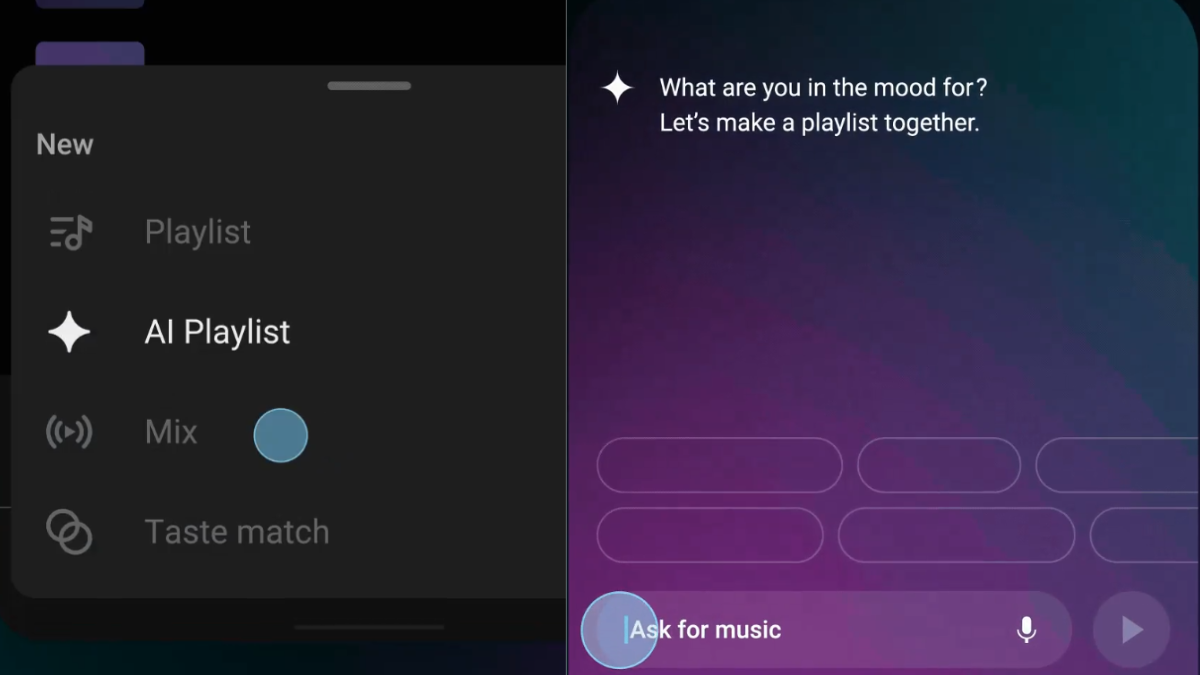
YouTube Music AI Playlist feature (Image: YouTube Music)


YouTube Music has introduced a new AI Playlist feature for Premium subscribers. The company shared the announcement on X (formerly Twitter), confirming that the feature is rolling out on Android and iOS. With this tool, users can create playlists by describing what they want to listen to. Instead of adding songs manually, they can type or speak a mood, idea, or genre, and the app will automatically generate a personalised playlist.


Similarly, Spotify has recently introduced a feature called Prompted Playlist that lets users create playlists by typing what they want to hear, with songs generated based on their listening history and trends.


YouTube Music’s AI Playlist feature: How it works


According to the company, Premium subscribers can create a personalised playlist simply by describing an idea, mood, or music genre. Instead of manually searching for songs, they can enter a text prompt or use their voice, and the AI Playlist feature will generate a playlist based on what they describe. According to the post on X, the feature appears with a Gemini-style logo.


The AI Playlist tool is designed to make playlist creation faster and more flexible for Premium subscribers, although Google has not shared details about how much editing control users will have after a playlist is generated.


How it compares to existing features

YouTube Music already introduced a natural-language music feature called “Ask Music” in 2024. That tool allowed users to request songs using simple prompts. However, AI Playlist seems more focused on building full playlists rather than creating a radio-style listening session. 


Steps to use YouTube Music’s AI playlist feature


  • Open the YouTube Music app on Android or iOS

  • Go to the Library tab and tap the “New” button

  • Select “AI Playlist”

  • Use text or voice to describe the type of music you want

  • The app will generate a playlist based on your prompt


First Published: Feb 11 2026 | 4:39 PM IST


Source link

Google to soon release Android 17 beta 1 for public testing: What to expect

Google to soon release Android 17 beta 1 for public testing: What to expect


Google has confirmed that Android 17 beta 1 is on the way and will arrive “soon” for public testing. The announcement came right after the release of Android 16 QPR3 Beta 2.1, signalling that the next major Android version is about to enter its public beta phase. This year, Google is likely changing how it phases new Android releases. Instead of starting with a separate Developer Preview build, Android 17 will go straight to beta 1.


According to a report by Smartprix, this is because experimental changes are now handled earlier in Android Canary builds, while the beta release becomes the primary public testing track. The first Android 17 beta build carries the internal label “26Q2.”


Android 17 beta update: Details


Google said that if you are already enrolled in the Android Beta Program and are running Android 16 QPR3 Beta 2.1, Android 17 beta 1 will be pushed to your phone automatically. You don’t need to sign up again. Devices that stay in the beta programme will continue to receive future beta updates as they roll out.


However, once Android 17 beta is installed, you generally cannot remove it without wiping your phone until the beta cycle ends, which is expected around June 2026. If you want to avoid Android 17 beta testing, you should opt out now via Google’s official Android Beta site and wait for the stable Android 16 QPR3 release, expected as part of the March Pixel update.


So far, Google has not confirmed specific features for Android 17. The OS is expected to have the codename “Cinnamon Bun,” and the beta timeline points to a stable release around mid-2026 after public testing. 


According to Smartprix, possible improvements may include performance enhancements, refinements to the Material 3 Expressive design language, and deeper on-device AI changes, although it is likely that Android 17 beta 1 will build on the Android 16 QPR base and include the latest stability and performance fixes before moving into later beta updates.


Source link

Google Photos brings 'Create with AI' templates to iPhone, iPad: What's new

Google Photos brings 'Create with AI' templates to iPhone, iPad: What's new


Google Photos reverse changes


Google is expanding its ‘Create with AI’ feature in Google Photos to iPhone and iPad users in India. The tool was first introduced on Android a few months ago and is now rolling out to Apple devices in selected regions. The feature allows users to transform their photos using ready-made AI templates.


With this update, iPhone and iPad users will be able to access a collection of templates that automatically apply edits and redesign photos. These templates include both general styles available to most users and personalised formats that may depend on eligibility requirements.


What ‘Create with AI’ does


According to Google, the “Create with AI” feature lets users choose from a range of built-in templates to modify their photos. Instead of manually editing images, users can apply AI-powered designs that adjust elements like layout, effects, and presentation. Google said that some templates are available to all eligible users, while others are limited to users who meet the requirements for Gemini features within Google Photos. This means certain advanced or specialised templates may not be accessible to everyone.


Google has said that it plans to regularly update the available templates. The idea is to keep adding new styles so users have fresh options when editing or sharing their photos.


Rollout status

The update is now expanding to iPhone and iPad devices in several countries. Apart from India, the feature is rolling out to users in Argentina, Bangladesh, Brazil, Colombia, Egypt, Indonesia, Japan, Mexico, Pakistan, the Philippines, Turkiye, and the United States. The feature was previously available only on Android devices. With this rollout, more users across platforms will be able to use AI-based templates directly within the Google Photos app. 


Eligibility requirements


  • To use Gemini features in Google Photos, users must:

  • Be 18 years old or older

  • Be an eligible user in a launched location

  • Have Face Groups turned on and have selected which face is yours

  • Have location estimates enabled


First Published: Feb 11 2026 | 2:16 PM IST


Source link

India's enterprise AI boom is driving surge in data leakage risks: Report

India's enterprise AI boom is driving surge in data leakage risks: Report


Indian enterprises are among the heaviest users of artificial intelligence and machine-learning (AI/ML) tools globally, and a substantial volume of sensitive data is moving into these systems, according to the recently released Zscaler ThreatLabz 2026 AI Security Report. The findings suggest that data flows tied to enterprise AI usage, and the associated data leakage incidents, are growing faster in India than in any other regions.


The ThreatLabz report, which analysed nearly one trillion AI/ML transactions observed through the Zscaler Zero Trust Exchange in 2025, found that enterprises worldwide transferred 18,033 terabytes of data to AI/ML applications over the year, a 93 per cent year-on-year increase. While these figures capture global activity, India stood out as the second-largest source of enterprise AI/ML traffic, with 82.3 billion transactions and 309.9 per cent year-on-year growth, behind the US. India also accounted for 46.2 per cent of all AI/ML traffic in the Asia-Pacific and Japan (APJ) region.


Indian enterprise usage and the volume of exposure


The growth figures reported for India point to rapid adoption of AI/ML tools across sectors that routinely handle sensitive data. While Zscaler’s dataset does not break down sector-wise traffic by country, the report identified finance and insurance, manufacturing, and engineering and IT functions as major sources of enterprise AI usage globally. In India, IT services, banking, financial services and insurance (BFSI), and technology companies are widely seen as heavy users of these tools, contributing to both traffic volumes and the scale of potential exposure.


Data leakage incidents linked to mainstream AI tools


The report flags data leakage as a key security concern as enterprises scale up their use of AI tools. According to Zscaler’s analysis, ChatGPT alone accounted for about 410 million data loss prevention (DLP) violations in the dataset, while coding assistant tools such as Codeium saw a 100 per cent year-on-year increase in data leakage incidents.


These violations include cases in which enterprise security controls flagged sensitive information being sent to AI applications. The most common categories of exposed data included personally identifiable information such as names and identifiers, national identifiers, source code, and medical and financial data, the report said.


The rise in DLP violations linked to tools like ChatGPT and Codeium suggests that many organisations are still in the early stages of defining what data can and cannot be shared with external AI services. As usage spreads across teams and functions, the number of potential leakage points also increases.   


Security context alongside rapid adoption


The ThreatLabz report also shows that enterprises are increasingly applying policy controls to AI traffic. Across the global dataset, about 39 per cent of AI/ML transactions were subject to blocks or inspection policies, reflecting efforts to balance AI adoption with security governance. Even so, with AI now embedded across multiple workflows and tools, maintaining consistent oversight remains a challenge.


The report notes that many enterprise AI systems are being integrated into business processes faster than organisations can build visibility and controls around them, contributing to gaps in data protection and threat detection. It also states that in controlled scans, some enterprise AI deployments surfaced critical weaknesses within minutes rather than hours, underlining how quickly such systems can be exposed if not hardened against targeted attacks.


Source link

Airtel introduces AI system to warn users of OTP frauds: How it works

Airtel introduces AI system to warn users of OTP frauds: How it works


Telecom operator Airtel has launched a new AI-based security system to help protect customers from bank fraud linked to OTP scams. According to the company, the solution operates at the network level and sends real-time alerts if it detects a potentially risky situation during a phone call. The company said that the aim is to stop users from sharing sensitive banking OTPs with fraudsters while they are still on the call.


The feature is part of Airtel’s wider efforts to curb spam and fraud on its network and strengthen protection against digital scams. The AI-based security system is currently active in Haryana, and Airtel plans to roll it out to all customers across the country within the next two weeks.


Airtel’s AI-powered protection from fraud: How it works


How OTP scams work


Airtel said that fraud related to One-Time Passwords (OTPs) has become increasingly common. Scammers often create a sense of urgency by pretending to be delivery agents, bank officials or service providers. They convince customers that an OTP is needed to complete a simple task, such as receiving a parcel or resolving an issue.


In reality, the OTP is linked to a banking transaction. Once the customer shares it, fraudsters can misuse it to withdraw money or complete unauthorised payments. 


How Airtel’s new AI fraud alert works


Airtel’s new system uses artificial intelligence to identify risky situations during incoming calls. If a bank OTP is triggered while a user is on a potentially suspicious call, the system detects it in real time.


At that moment, Airtel sends a fraud alert to the customer, warning them about the risk of sharing the OTP while still connected to the caller. The alert encourages users to pause and verify before giving consent for any banking-related OTP delivery.


According to Airtel, the idea is to give customers extra time to think and avoid reacting under pressure by combining AI-based detection with user awareness. With this, the service provider aims to reduce the chances of OTP-related bank fraud.


Part of an anti-spam push

Airtel mentioned that the launch of this AI-powered fraud alert is part of Airtel’s ongoing efforts to make its network safer. With OTP scams rising across the country, telecom-level intervention could help prevent fraud before money is lost. The company said the system works in real time and is designed to add an extra layer of protection for customers during suspicious calls. 


The company said that over the past two years, Airtel has introduced several AI-based safety measures, including spam call alerts and blocking of malicious links, to prevent fraud at the network level. 


Source link

YouTube
Instagram
WhatsApp