
by Hansraj Agrawal | Jun 5, 2024 | Technology
2 min read Last Updated : Jun 05 2024 | 2:44 PM IST
Google’s video streaming platform YouTube offers various options at the bottom of the video for users to react with and allow sharing the video or to watch later. The number of likes increase when a user taps on the thumbs up icon, but for many users the like button has been vanishing from sight. In what is reportedly a bug, the thumbs up icon under the videos has been disappearing. Although likes on the videos available on the platform still get registered, the icon is no longer visible after tapping, leaving an empty space.
This problem has been faced by many and on various browsers. The video sharing platform has clarified about the issue in a support page that was published on Tuesday that the issue is being faced only on videos on the web and not on mobile. It has assured that it is looking into the issue as the like button “isn’t working as intended”.
Here is what you may be experiencing
Thumbs up icon not showing on the like button
Thumbs up icon disappearing after liking a video
The button still works to register a like on the video, but may show you a blank space once you tap on it. “Rest assured, whether or not the icon is showing, the video is still receiving the like!,” confirmed YouTube.
It is not clear when the issue will be resolved but YouTube has said that they follow up on the support page when they have an update. Reddit users faced a similar issue a few months ago and have been sharing about it.
Dislike button, on the other hand, has been working as before, although the number of dislikes were hidden by YouTube a few years ago.
First Published: Jun 05 2024 | 2:44 PM IST
Source link

by Hansraj Agrawal | Jun 5, 2024 | Technology
3 min read Last Updated : Jun 05 2024 | 2:30 PM IST
OPPO on June 5 announced that it will bring over 100 generative artificial intelligence (gen-AI) features to its entire smartphone line across price segments by the end of 2024. The Chinese smartphone maker announced collaboration with technology giants in the field of AI, such as Google, Microsoft, and MediaTek, to bring AI capabilities on its smartphones in areas such as image processing, natural language processing, and smart charging. Moreover, the company said it has filed for 5,399 patents globally related to AI.
“With our relentless efforts and commitment, OPPO aims to make AI phones accessible to everyone,” said Billy Zhang, President of Overseas market, Sales, and Service at OPPO. “For the first time in the industry, OPPO is bringing generative AI to all product lines. By the end of this year, we expect to bring generative AI features to about 50 million users.”
OPPO said its flagship smartphones series will feature large language models (LLMs) from Google’s Gemini family, which will enable AI features such as AI Toolbox – including AI Writer and AI Recording Summary. According to OPPO, the AI Writer will provide content suggestions, such as sentence completions, word choices, and grammar corrections to enhance the overall quality of the content. Additionally, this tool will support language translation, enabling content creation in multiple languages. Sharing details related to the AI Record Summary, OPPO said this tool will auto-summarise meetings, transcripts, podcasts, etc., allowing users to grasp a document’s essence without extensive reading. This tool will also highlight important information such as dates, names, and specific terms to ensure critical details are not overlooked.
“Next-gen AI Smartphones will represent a major transformative stage in the mobile phone industry”, said Pete Lau, Chief Product Officer of OPPO. “We are dedicated to becoming a contributor and promoter of AI smartphones. We look forward to working with our industry partners to jointly drive the innovation of the mobile phone industry and reshape the intelligent experience of mobile phones.”
OPPO said it will bring a more efficient, accurate and natural voice and text conversion experience powered by Microsoft Fast Transcription and Neural TTS technologies. OPPO said it has been able to create a smooth user experience for audio recording transcription with the new fast transcription feature of Microsoft’s Azure AI Speech Service. Additionally, OPPO said its collaboration with Microsoft will help it expand connection to Windows PCs. OPPO said its smartphones users will be able to use Microsoft Copilot to generate content, translate text messages, and search addresses on their smartphones via a connected PC.
Detailing its collaboration with MediaTek, OPPO said it is working with Taiwanese semiconductor entity to optimise AI features for its hardware and software stack. Moreover, OPPO said its collaboration with MediaTek extends to developing custom AI frameworks tailored to its needs; this allows the brand to leverage the chipmakers’ expertise while creating unique AI features for its devices.
First Published: Jun 05 2024 | 2:30 PM IST
Source link

by Hansraj Agrawal | Jun 5, 2024 | Technology
Garmin Forerunner 165 series
2 min read Last Updated : Jun 05 2024 | 2:20 PM IST
Garmin on June 5 launched in India the Forerunner 165 series smartwatch at Rs 33,490. Aimed at athletes and adventure enthusiasts, the GPS smartwatch sports an AMOLED display and offers various activity tracking and health-and-fitness monitoring features. Garmin said that the Forerunner 165 series smartwatch is specifically designed for professional runners and athletes, offering them with suitable training modules and tracking capabilities.
Garmin Forerunner 165 Series: Price and availability
The Garmin Forerunner 165 series is priced at Rs 33,490 and comes with a two-year warranty. The smartwatch is offered in four dual-colour themes – Turquoise/Aqua, Black/Slate grey, Mist grey/Whitestone, and Berry/Lilac.
The Garmin Forerunner 165 Series smartwatches will be available at select premium brand stores starting June 5.
Garmin Forerunner 165 series: Details
The Garmin Forerunner 165 series features a 43mm case and come with colourful dual-shot bands. It comes with built-in GPS for pace and distance tracking. Additionally, the smartwatch allows downloading playlists from Spotify or Amazon Music to stream it directly on to wireless earphones without necessitating a smartphone connection.
As for the fitness and health tracking features, the Garmin Forerunner 165 series offers wrist-based running power measurement, training effect monitoring, blood oxygen monitoring, sleep monitoring, nap detection, and more. It comes with over 25 activity profiles, including trail running, open water swimming, pickleball, tennis, and more. Additionally, the smartwatch provides a morning report, offering insights into last night’s sleep, day’s training outlook along with heart rate variability status.
The Garmin Forerunner 165 series offers adaptive training plans for athletes. Athletes can put-in their race details into Garmin Connect companion app for personalised plans alongside preset Garmin Coach plans. The smartwatch is also equipped with women’s health tracking features such as menstrual cycle and pregnancy monitoring.
First Published: Jun 05 2024 | 2:20 PM IST
Source link
by Hansraj Agrawal | Jun 5, 2024 | Technology
2 min read Last Updated : Jun 05 2024 | 1:41 PM IST
Home-grown smartphone brand
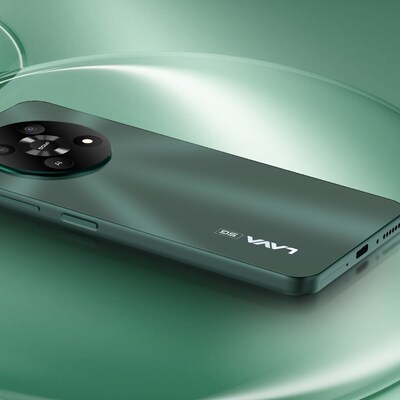
Lava’s budget smartphone Yuva 5G is now available for purchase. Priced at Rs 9,499 onwards, the Lava Yuva 5G smartphone comes with 4GB RAM and up to 128GB on-board storage configuration. The budget 5G smartphone is available on Amazon and Lava website. The smartphone is offered in Mystic Blue and Mystic Green colours with matte finish and a side mounted fingerprint sensor.
Lava Yuva 5G: Pricing and availability
-
4GB RAM + 64GB storage: Rs 9,499
-
4GB RAM + 128GB storage: Rs 9,999
The Lava Yuva 5G smartphone is now available on e-commerce platform Amazon India, Lava e-store and Lava retail outlets.
Lava Yuva 5G: Specification
Powered by the UNISOC T750, paired with 4GB RAM and up to 128GB storage, the Lava Yuva 5G smartphone sports a 6.52-inch HD+ display of 90Hz refresh rate. The Yuva 5G features a 50-megapixel primary sensor and a 2MP depth sensing camera sensor on the rear. At the front, the smartphone has an 8MP camera for selfie, video calls, and more. As for the camera features, Lava offers portrait, slow motion, timelapse, audio note, motion photo, ultra-resolution, beauty, HDR, night, AI, PRO, panorama, and more. The smartphone is powered by a 5,000mAh battery and boots Android 13 operating system with a clean user interface. Lava has promised Android 14 and two years of security update for the smartphone.
-
Display: 6.5-inch HD+ display, 90Hz refresh rate
-
Processor: UNISOC T750 chip
-
RAM: 4GB
-
Storage: 64GB and 128GB
-
Primary Camera: 50MP+2MP
-
Front Camera: 8MP
-
Battery: 5000mAh, 18W charging
-
OS: Android 13
-
Colours: Mystic Blue and Mystic Green
First Published: Jun 05 2024 | 1:41 PM IST
Source link

by Hansraj Agrawal | Jun 5, 2024 | Technology
ASUS ROG Zephyrus G16 and ProArt PX13
4 min read Last Updated : Jun 05 2024 | 1:32 PM IST
Taiwanese electronic maker
ASUS has announced its new range of AI-enhanced laptops, powered by the recently launched AMD Ryzen AI 300 series chips. The new range includes models in its ROG and ProArt series, focusing on gamers and creators respectively. In the ROG line, ASUS announced the Zephyrus G16. In the creators-focused ProART line, ASUS unveiled the ProArt PX13 and the ProArt P16 laptops. All three laptops feature the new AMD Ryzen AI 9 HX 370 processor, which boasts an integrated Neural Processing Unit (NPU) capable of 50 TOPS AI performance. Additionally, all three laptops feature up to Nvidia RTX 4070 graphics processing unit (GPU) for gaming and content creation.
ASUS ROG Zephyrus G16 (2024): Details
The ROG Zephyrus G16 is powered by the new AMD Ryzen AI 9 HX 370 processor with Ryzen AI XDNA 2 NPU, which is capable of executing 50 trillion operations per second (TOPS) of AI workloads. Additionally, the highest specification model gets the Nvidia RTX 4070 GPU that itself is capable of 321 TOPS. Leveraging this local AI processing power, the laptop offers features like DLSS 3 super resolution that uses AI to generate additional frames improving the in-game visuals and smoothness. The laptop comes with a new by ROG Intelligent Cooling mechanics, including liquid metal on the CPU and a new fibre-and-mesh heat-pipe system with a tri-fan design for keeping thermals in check.
-
Processor: AMD Ryzen AI 9 HX 370
-
GPU: Up to NVIDIA GeForce RTX 4070 Laptop GPU
-
Memory: Up to 32GB LPDDR5X-7500 MHz
-
Storage: Up to 4 TB (2 TB + 2 TB) M.2 2280 PCIe 4.0 SSD
-
Display: 16-inch OLED, 2.5k resolution, 240Hz refresh rate, Pantone validated, Dolby Vision, 100 per cent DCI-P3 with NVIDIA G-SYNC, VESA DisplayHDR True Black 500
-
Audio: Stereo Speakers, Dolby Atmos, AI noise cancellation
-
Connectivity: Wi-Fi 7, Bluetooth v5.4
-
Ports: 1 x USB4 (supports DisplayPort / Power Delivery), 1 x Type C USB 3.2 Gen 2 (supports DisplayPort / Power Delivery), 2 x Type-A USB 3.2 Gen2, 1 x HDMI 2.1, 1 x SD Card Reader (SD 7.0), 1 x Audio jack, 1 x ASUS Slim Power Jack
-
Battery: 90Wh
-
OS: Windows 11 Pro
-
Weight: 1.85Kg
ASUS ProArt P16: Details
With the same AI processing power as the ROG Zephyrus G16, the ASUS ProArt P16 laptop features AI-powered apps and tools for assisting users with creative tasks. One of these apps is StoryCube, which ASUS said uses an AI assistant to sort, edit, manage and export captured raw files. The laptop also comes with a ProArt Creators Hub, which serves as the go-to place for monitoring the laptops performance, device status and customising performance based on usage.
-
Processor: Up to AMD Ryzen AI 9 HX 370
-
GPU: Up to NVIDIA GeForce RTX 4070 Laptop GPU
-
Memory: Up to 64GB LPDDR5X on-board
-
Storage: Up to 4 TB M.2 NVMe PCIe 4.0 SSD
-
Display: 16-inch OLED touchscreen, 4K resolution, 16:10 aspect ratio, 60 Hz refresh rate, rate, 500 nits HDR peak brightness, 100 per cent DCI-P3 colour gamut, VESA-certified DisplayHDR True Black 500, Pantone validated
-
Audio: Harman Kardon built-in speakers
-
Connectivity: Wi-Fi 7, Bluetooth 5.4 Wireless Card
-
Ports: 1 x USB4 supports display / power delivery,1 x USB 3.2 Gen 2 Type-C supports display / power delivery, 2 x USB 3.2 Gen 2 Type-A, 1 x HDMI 2.1 FRL, 1 x 3.5 mm Combo Audio Jack, 1 x DC-in, SD Express 7.0 card reader
-
Battery: 90 Wh
-
OS: Windows 11 Home / Pro
-
Weight: 1.85Kg
ASUS ProArt PX13: Details
The ASUS ProArt PX13 laptop features the same AI-powered features as the ProArt P16 model including SmartCube, MuseTree, ProArt Creators hub, and more.
-
Processor: Up to AMD Ryzen AI 9 HX 370
-
GPU: Up to NVIDIA GeForce RTX 4070 Laptop GPU
-
Memory: Up to 32GB LPDDR5X on-board
-
Storage: Up to 2 TB PCIe Gen4 SSD
-
Display: 13.3-inch OLED touchscreen, 3K resolution, 16:10 aspect ratio, 60 Hz refresh rate, 500 nits HDR peak brightness, 100 per cent DCI-P3 colour gamut, VESA-certified DisplayHDR True Black 500, Pantone validated
-
Audio: Harman Kardon built-in speakers
-
Connectivity: Wi-Fi 7, Bluetooth 5.4 Wireless Card
-
Ports: 1x USB 3.2 Gen 2 Type-A, 2x USB 4.0 Gen 3 Type-C support display / power delivery
-
1x HDMI 2.1 FRL, 1x 3.5 mm combo audio jack, 1x DC-in, microSD 4.0 card reader
-
Battery: 73Wh
-
OS: Windows 11 Home / Pro
-
Weight: 1.38Kg
First Published: Jun 05 2024 | 1:32 PM IST
Source link

by Hansraj Agrawal | Jun 5, 2024 | Technology
Nothing Phone 2a Special Edition
2 min read Last Updated : Jun 05 2024 | 11:55 AM IST
The Nothing Phone 2a Special Edition is going on sale today, on June 5, for the first time in India. Announced on May 29, the Phone 2a’s Special Edition features a transparent design, similar to the original model, but with red, yellow, and blue colour accents underneath the back panel for new visual identity.
Nothing Phone 2a Special Edition: Price and introductory offer
Nothing is offering the Phone 2a Special Edition only in 12GB RAM and 256GB storage configuration, at Rs 27,999. As for the introductory offers, there will be a Rs 1,000 discount from select bank cards.
Nothing Phone 2a Special Edition: Details
The Nothing Phone 2a Special Edition has white as base colour and grey coloured sections around the camera module and on the lower half. The camera module itself is in blue, and there are red and yellow accents scattered all over to highlight certain elements on the back.
Except for the design, the Special Edition is identical to the standard Phone 2a. It sports a 6.7-inch fullHD AMOLED display of 120Hz refresh rate. The smartphone is powered by MediaTek Dimensity 7200 Pro system-on-chip, paired with 12GB RAM and 256GB on-board storage. It has a dual 50-megapixel camera system on the rear, and a 32MP camera on the front. 5000 mAh battery, supported by 45W wired charging, powers the smartphone. The Nothing Phone 2a Special Edition boots Android 14 operating system-based Nothing OS.
Nothing Phone 2a Special Edition: Specifications
-
Display: 6.7-inch fullHD AMOLED, 10-bit, 120Hz
-
Rear camera: 50MP main with optical image stabilisation + 50 MP ultra-wide-angle
-
Front camera: 32MP
-
Processor: MediaTek Dimensity 7200 Pro
-
RAM: 12GB
-
Storage: 256GB
-
Battery: 5,000 mAh
-
Charging: 45W, wired. No wireless charging
-
Software: Android 14
-
UI: Nothing OS 2.5
-
Support: Three years of Android updates and four years of security patches
First Published: Jun 05 2024 | 11:52 AM IST
Source link







