Microsoft announces text-to-speech avatar tool to create talking videos

Microsoft announces text-to-speech avatar tool to create talking videos


Microsoft has recently announced its latest text-to-speech features that come with vision capabilities, enabling users to create talking avatar videos with the help of text inputs. The new feature will also help to build an interactive bot trained using human images. 


The latest text-to-speech avatar system has features with vision capabilities allowing customers to develop synthetic videos of a 2D photorealistic avatar speaking. The neural text-to-speech model is trained by deep neural networks based on human video recording samples. The voice of the avatar will be provided by a text-to-text-to-speech voice model.


This text-to-speech avatar will help the users to create more engaging digital interactions and also to build conversational agents, chatbots, virtual assistants and more.


This is designed with the aim of protecting individual and society’s rights, fostering transparent human-computer interaction, and counteracting the proliferation of harmful deepfakes and misleading content.


Why did Microsoft build a text-to-speech avatar?


According to Microsoft’s text-to-speech avatar:


Traditional video content generally takes a lot of time and budget, which includes setting up a video shooting environment, filming videos, editing, etc. This Microsoft avatar will reduce your dependency on traditional ways of video creation and help you create videos efficiently. The avatar will also help users build training videos, customer testimonials, product introductions, etc., with the help of text input.


The release of Azure OpenAI Service and neural text-to-speech, the interactive conversation is much more natural than before. This avatar helps in creating more engaging digital interaction. The user can also use this to build conversational agents, virtual assistants, chatbots and more.


According to the official website, there are three workflows of content generation, i.e., TTS audio synthesiser, text analyser, and TTS avatar video synthesiser.


The company offers two separate text-to-speech avatar features at this time. One is a prebuilt text-to-speech avatar and the other is a custom text-to-speech avatar.


According to the company website, “Microsoft offers prebuilt text-to-speech avatars as out of box products on Azure for its subscribers. These avatars can speak different languages and voices based on the text input. Customers can select an avatar from a variety of options and use it to create video content or interactive applications with real-time avatar responses.”


Video content creation through text-to-speech avatar


Start with a talking script for your avatar or you can even use plain text format or Synthesis Markup Language (SSML). SSML helps you in tuning the voice of your avatar which includes pronunciation, and expression of terms like brand names, along with gestures like waving and pointing to an item.


Once you are ready with your talking script, you can use Azure TTS 3.1 API to synthesise your video. Besides the inputs of SSML, you can also specify your avatar character and its style and even the format of your desired video.


If you want, you can also add content images, videos with text, animations, illustrations, etc. to come up with the final video.


Combine all your assets including avatar video, content and option background music and compose your rich video experience.

Source link

‘123456’ the most common password, can be cracked in under a second: Study

‘123456’ the most common password, can be cracked in under a second: Study


The most common password was “123456” and a hacker would probably take less than a second to crack it, according to a study conducted by NordPass, a software company that helps users organise their passwords.


The password “123456” was held by about 45 lakhs accounts, the study found in partnership with independent experts specialising in researching cybersecurity incidents, according to the Panama-based company’s website.


The second and the third most popular passwords were “admin” and “12345678”, used in about 40 lakhs and 13.7 lakhs accounts, respectively, the study findings on the website show.


In India, the most common password was “123456”, kept in around 3.6 lakhs accounts, followed by “admin”, used in around 1.2 lakhs accounts, according to the website.


The research team analysed passwords from a 6.6 Terabyte-database, which were stolen by employing various stealer malware, such as Redline, Vidar, Taurus, Raccoon, Azorult, and Cryptbot, it said.


Malware logs included both passwords and the source website and the researchers’ database included data from up to 35 countries.


The researchers classified the data into various verticals, which allowed them to perform a statistical analysis based on countries, NordPass’s website said.


NordPass exclusively received only statistical information from the researchers, which gives no reference to internet users’ personal data, it said.


Further, no personal data was acquired or purchased by NordPass to conduct this study, the website said.


“Streaming lovers seem to be strong password haters,” NordPass said, referring to users who enjoyed streaming online content. The study found that compared to other popular websites, people choose the poorest credentials to secure accounts on this platform category.


The website also acknowledged “123456” to be the “world’s worst password” as it was ranked the most common password 4 out of 5 times, while “Password” held this title once throughout the lifetime of the study.

NordPass quoted the researchers while saying that “while passwords are getting harder to breach due to rapidly evolving technologies, malware attacks are still seen as a prominent threat for account security.”

The password manager company advised account holders to use complex passwords that were at least 20 characters long and included a mix of uppercase and lowercase letters, numbers and special symbols.


NordPass also asked password users to desist from reusing the same password across multiple websites or services, as compromising one account could risk the safety of all the other accounts.


Further, it called for a “regular” assessment of the passwords for their health and improving them for a “safer online experience”, in addition to advocating the use of password managers such as itself.

(Only the headline and picture of this report may have been reworked by the Business Standard staff; the rest of the content is auto-generated from a syndicated feed.)


Source link

Qualcomm announces Snapdragon 7 Gen 3 with built-in AI capabilities

Qualcomm announces Snapdragon 7 Gen 3 with built-in AI capabilities


Image: Qualcomm Snapdragon 7 Gen 3


American chip manufacturer Qualcomm has announced its Snapdragon 7 Gen 3 chip lineup on November 17. The new chip series plans on bringing similar built-in generative- AI capabilities from its more powerful counterpart- Snapdragon 8 Gen 3, to mid-range smartphones.


“Intelligently designed to balance performance and power efficiency, the Snapdragon 7 Gen 3 Mobile Platform delivers a selection of premium experiences that are brand new to the Snapdragon 7-series,” said Christopher Patrick, senior vice president and general manager of mobile handsets, Qualcomm Technologies.


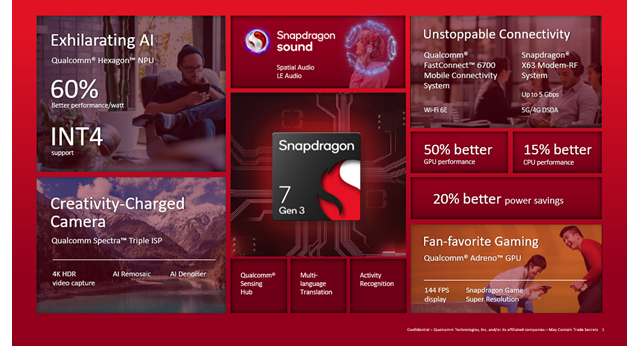
Snapdragon 7 Gen 3 with 4nm architecture gets a single prime core, three performance cores and four efficiency cores. For AI capabilities, Qualcomm says the new processor’s Hexagon NPU (Neural Processing Unit) provides 60 per cent more performance per watt compared to the previous generation chipset.


Qualcomm has also said that the new chipset offers up to 2.63GHz peak CPU speeds and over 50 per cent faster GPU (Graphic Processing Unit) performance.


For Imaging, the Qualcomm Spectra Triple ISP (Image signal processor) adds support for 4K HDR videos and new AI-based features, including AI Remosaic and AI Denoiser. The company has also added spatial audio support with head tracking for the third generation of the Snapdragon 7-series.


“By working closely with our OEM partners, we’re able to help make the next generation of in-demand features, such as enhanced AI and extraordinary camera capabilities, more widely accessible to consumers,” Patrick added.

Qualcomm has confirmed that Chinese smartphone manufacturers- HONOR and Vivo will be the first to offer the new snapdragon 7-series platform on their devices, with the first commercial devices expected to be announced this month.

First Published: Nov 17 2023 | 1:41 PM IST


Source link

Google rolls-out experimental ‘Notes’ feature for search in India: Details

Google rolls-out experimental ‘Notes’ feature for search in India: Details


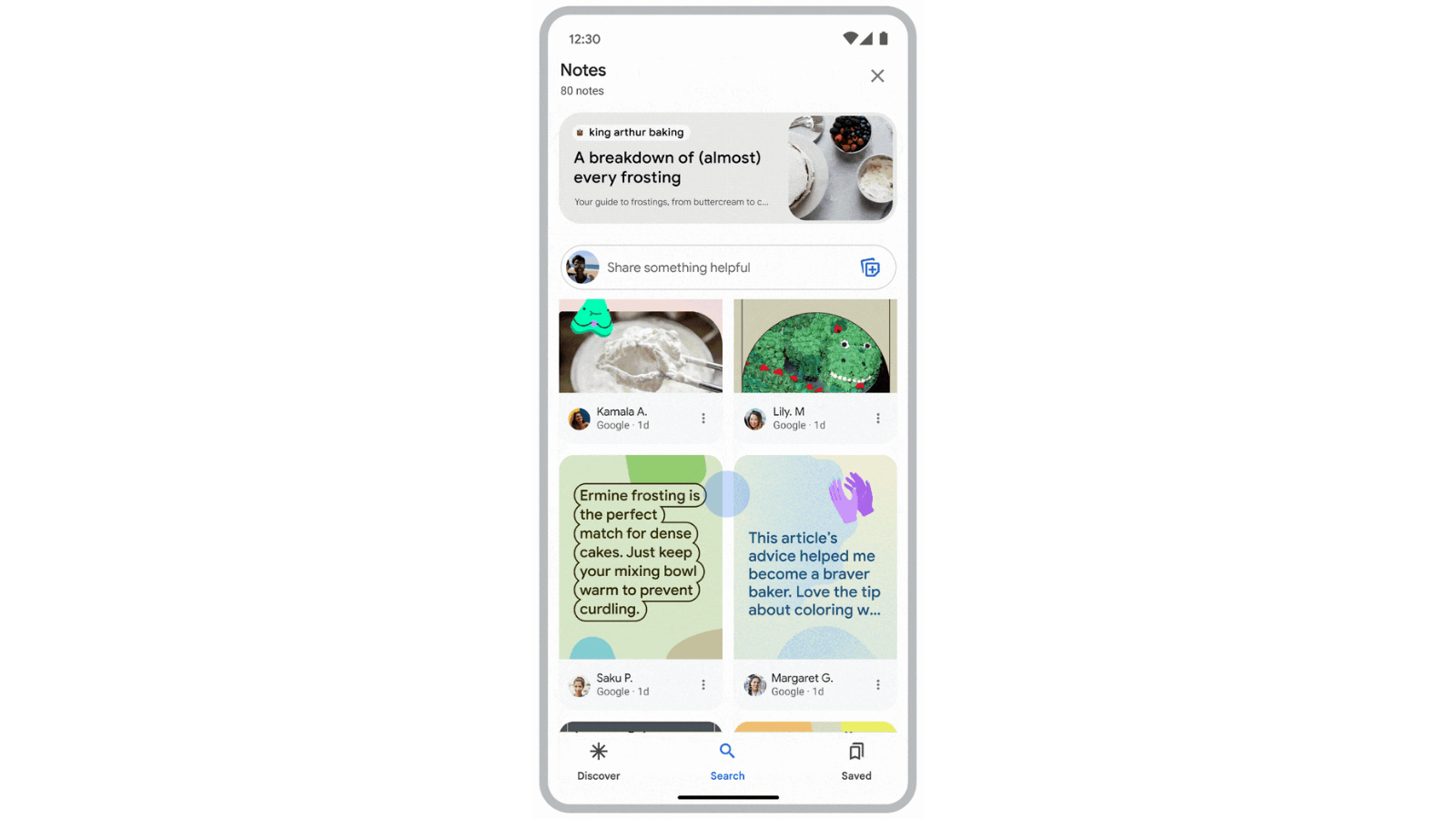
Google has announced that it is currently testing a new notes feature for search. In a blog post, the Alphabet-owned software giant said that “Notes” will let people share their knowledge right on search, helping others find the best answers to their questions and discover what’s most useful for them on the web.


This experimental feature provides users with helpful context about a web page to better identify information. Users can also leave a note to help other people looking for specific information on that web page.


The new feature is available as an opt-in experiment in Search Labs in the Google app on both iOS and Android devices. The company confirmed that the feature has started to roll out for opted-in users in the US and India. Notes also gets Hindi language support for Indian users.


How to enable Notes on the Google App


  • Open the Google App on your Android or iOS device

  • Tap on the Google Search Lab icon at the top left corner of the home screen

  • Turn on the Notes from a toggle switch under “Notes on Search” section


If Google prompts you, saying, “Search Labs isn’t available for your account”, try updating the Google app to the latest version or sign in using a personal Google account, as Search Lab is not available for workspace accounts.


Once opted-in, you will see a “Notes” button appear below search results in the Google app and on articles on Discover. Tap this button, and you can see what others have said about the web page. When you visit a page you think is helpful, you can create a note to share your experience with the topic or article.


Google has also added customisation options for adding Notes with elements like text fonts, stickers and photos. The US version of the feature also lets users add an AI-generated Image to their Notes. This update is not currently available for Indian users.


The company has confirmed that in the coming months, it will start exploring ways to provide site owners with insights about Notes that have been added to their content.

First Published: Nov 17 2023 | 1:30 PM IST


Source link

WhatsApp Security Upgrade: Privacy checkup feature for safer chats

WhatsApp Security Upgrade: Privacy checkup feature for safer chats


One of the most popular messaging applications, WhatsApp, brings a privacy checkup feature on Android and iOS devices to enhance the security of the social media platform. 


While announcing the new Privacy Checkup feature, Meta said, “This step-by-step feature guides you through important privacy settings to help you choose the right level of protection, all in one place. Selecting ‘Start checkup’ in your Privacy settings will navigate you through multiple privacy layers that strengthen the security of your messages, calls, and personal information.”


How to use Privacy Checkup on your phone?


When you open your WhatsApp application on your Android or iOS device. 


Just click on the three dots at the right corner and then click on the setting option. Inside the setting option, there is a privacy tab, click on it, and you will get the Privacy Checkup feature on the top of it. Thereafter, you can adjust your privacy settings through Privacy Checkup features.


Here are the settings you can adjust for safer chats


Who can contact you?


There are plenty of unknown people who contact you through unwanted calls and messages. Users can control who can contact you and you can prevent unwanted calls and messages. You can also restrict people who can add you to groups, silence unknown callers and manage your blocked contact list.


Control personal information


You can also choose the people you want to share your personal details with, which include your online status, profile picture and other activity. You can select who can see your profile picture, last seen or online status, and you can even manage read receipts.


Privacy to your chats


You can start chatting with your friends with a disappearing message timer. You can set the disappearing messages timer to 24 hours, 7 days, and 90 days. You can also activate end-to-end encrypted backups with a password.


Fingerprint protection


You can protect your WhatsApp account and messages with the help of adding an extra layer of security with a fingerprint lock and two-step verification control.

First Published: Nov 17 2023 | 1:12 PM IST


Source link

70% of passwords can be cracked in less than a second, shows NordPass study

70% of passwords can be cracked in less than a second, shows NordPass study


As many as 70 per cent of the passwords in this year’s global list can be cracked in less than a second, showed the fifth edition of the NordPass study.


The study stated that in 2023, “123456” was the most commonly used password among Indians. In India, last year’s global winner, “password”, “Pass@123”, and other similar variations were among the most commonly used passwords this year, according to a report in The Times of India (TOI).


NordPass study showed the kind of passwords used by people on different platforms and whether they vary in strength. Almost a third (31 per cent) of the world’s most popular passwords consist of just numerical sequences, such as “123456789″, “12345″, and “000000″.


The study further showed that internet users usually choose the name of a country or city as a password. In India, “India@123” was ranked high in the country’s list. Moreover, “Barcelona” is trending in Spain, and “Kalamata” in Greece.


People use the weakest passwords for their streaming accounts, the study showed. Tomas Smalakys, chief technology officer (CTO) at NordPass, said that the reason behind this could be associated with people managing shared accounts and using easy-to-remember passwords for ease. 


Smalakys said that the strongest passwords are used for all financial accounts.


According to the TOI report, the study said that internet users use already pre-configured passwords, such as the word “admin” which is one of the passwords that people do not bother changing. “Admin” was among this year’s most common passwords in India and many other countries.

First Published: Nov 17 2023 | 12:25 PM IST


Source link

YouTube
Instagram
WhatsApp




